The End of "Who's Driving Today?"
August 13, 2026 · Krishna Kamath
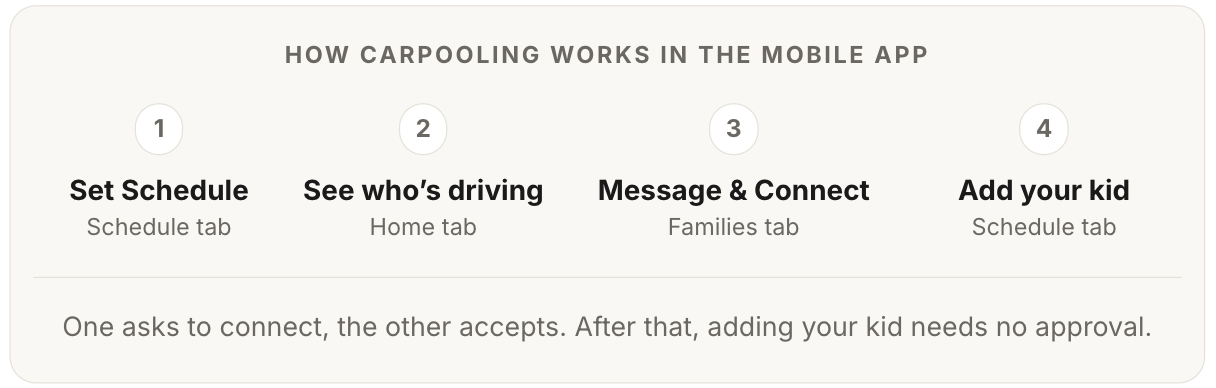
Most families use Carpool.School the same way: post a request, browse nearby families, message someone promising. That's discovery, and it works.
Then they find their carpool, and stop using the app. The rotation lives in a group chat. The schedule gets settled one morning at a time: "who's driving today?" And the ride itself runs on "omw," "ETA?" and "where are you?" texts sent from the curb.
The half of the app built for exactly that part is the half most families haven't opened. It runs the carpool after you've found it, and it does more than any group chat can.
Schedule: the whole semester, once
The Schedule tab is a calendar, and it works from day one, before you know a single family. Setting yourself as the driver is flexible:
- Tap a single day.
- Select a batch of days at once, every Tuesday and Thursday for a month.
- Press and hold to sweep a whole range.
Post them all in one step. A family that knows its fall routine can schedule the entire semester in one sitting.
Those posted drives do double duty: they're your own plan, and they're what other families near you see when they look for a ride. More on that below.
Connections: whose car your kid rides in
Driving your own kid needs nobody's permission. Putting your kid in another family's car is different, and the app draws that line deliberately: your kid can only join the drives of a family you're connected with. And a connection is not a like or a follow. It's two-sided: one family asks, the other accepts, and nothing exists until they do.
The flow is simple enough to walk through without a manual. Tap Connect on any family, and the app leads with why: connecting is what lets your kid join their drives when scheduling. Right below that sits a standing reminder to meet in person first, same judgment you'd use meeting anyone new, and a note to write before you can send the request.
The app never rushes this step. However, once you decide to connect, the rest of your experience is streamlined: a request arrives as a notification that takes them straight to your profile and note, and an acceptance comes back to you the same way.
Once connected, the rotation builds itself from both calendars. Nobody assigns anybody: each family posts its own driving days, and joining is the only move. Pick your dates, pick the family, and the app lays their posted days over yours. Days they're already driving, your kid joins. Days they're not, you cover yourself or keep looking.
You are not texting "can you take Thursdays?" You are looking at their Thursdays.
A connection isn't permanent. Either family can end it any time, no reason required — neither kid can join the other's new drives afterward. Rides you're already on together aren't automatically undone. You can always reconnect later by asking again.
Carpools: the rules of the ride
Once a drive is on the calendar, it stops being a note in one parent's phone. Other families add their own kid to it themselves. But there are rules:
- Who can add a kid? Their own parent, and only to a connected family's drive.
- Does the driver approve each join? No. That yes was said at connection time; the driver is notified instead.
- Who can remove a rider? The kid's parent, or the driver. Either way, the other side hears about it.
- Which kids can be added? Only those in the community the drive was posted in, and only by a parent directly connected to the driver.
- How many kids can be added to one drive? Eight, max, counting the driver's own. Real seat counts are between the families.
- Can the rider list change mid-ride? No. The list locks as the ride starts; once kids are aboard, nobody is added or removed.
Every carpool also gets its own group chat, one tap, with every parent in the pool already in it. Any individual parent is one tap away from a direct message. And the families you're connected with are one tap from a phone call: connecting unlocks each other's number, which stays private until then. The conversation and the schedule live in the same place, instead of slowly drifting out of sync.
Track Driver: the ride as it happens
On the day, the driver's screen is a status timeline. One tap at each step, as the ride actually happens:
- En route: the driver is on the way. Parents can watch the car's position on a live map for a window the driver sets, which turns off automatically when it ends.
- Picked up: the kids are in the car. Every rider's parent gets the notification the moment it's tapped.
- Dropped off: the ride is done, and everyone knows it without asking.
Nobody is texting "where are you?" from the curb. And if the school runs dismissal through Carpool.School, the timeline gains an arrival step: pickup confirmation waits until school staff have actually released each kid to that driver. That is a real handoff record, not an honor system.
Changes: everyone affected knows
Carpools are living arrangements: a pickup point moves, a time shifts, a kid stays home sick, a family's week falls apart. Every change flows through the schedule, and the schedule knows exactly who needs to hear about it:
- The driver moves the time or the pickup location: every rider's parent is notified.
- A drive is cancelled: same.
- Even handing off the wheel is built in. A driver can swap the drive to another parent, and everyone riding that day is told who's driving now.
Notice what's missing: confirmations. Nothing asks anyone to tap "still on for tomorrow?" A scheduled ride stands unless someone changes it, and only changes make noise. That's the opposite of a group chat, where silence is ambiguous and everyone re-confirms everything, every week. Here, silence means it's on.
A group chat notifies whoever happens to read it. The schedule notifies everyone it affects, whether the change came from the driver or a rider. On a school morning, that's the whole difference.
Home feed: real drives, not just requests
Discovery doesn't end once you're carpooling, because your needs don't. A new after-school activity lands on Wednesdays. A work schedule shifts. This particular week falls apart.
For that, Home shows more than standing requests. It also shows the families already driving near you in the coming days, grouped by driver, real drives on real routes. The family driving your street every Thursday is already doing the thing you need. Often the fastest way to a new carpool is simply seeing who's on the road this week and reaching out.
You don't even have to remember to look. Every Sunday evening, a community feed lands in your inbox: new families who joined, requests near you, activity matches for your kids, and your own carpools for the week ahead.
Close the loop
The whole app, one loop:
And when life shifts, the loop starts again.
You did the finding. Let the app do the running.